Laptop'nız Bir Stres Topu Gibi Mi? 5 Dakikada Sessiz Bir Sonbahar Duvar Kağıdı Paketiyle Değiştirin
Arka arkaya görüşmelerle uğraşırken ekranınız kaotik hissediyor. Bu 5 dakikalık kılavuz, tasarım bilgisi veya yorucu kaydırma olmadan sakinleştirici bir duvar kağıdı paketi seçmenize yardımcı olur. [Sonbahar Manzarası 8K Ultra HD Masaüstü Duvar Kağıdı Paketi](/packs/autumn-valley-lakeside-countryside-8k-c1188c8a) ile ilk kolay yükseltmenizi deneyin.
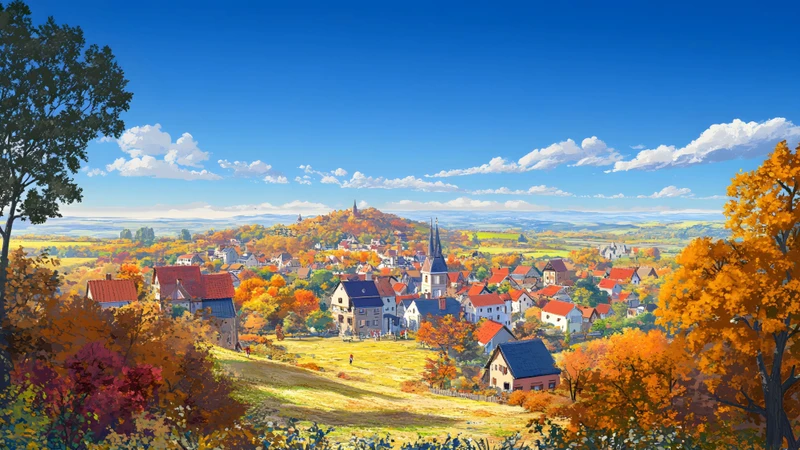
{"content":"Saat 08:47'de dizüstü bilgisayarını açarsın, zaten geride kalırsın — ilk gördüğün, gözlerini iki kez kırpmana neden olan düzensiz ve yüksek kontrastlı bir duvar kağıdıdır; Slack'e bakmadan önce bile.\n\nEkranın nötr değil. İş gününün ilk görsel girişi ve yattığın anda son gördüğü şeydir. Kaos varsa sinir sistemi beyninden daha hızlı fark eder. Bu yüzden sakinleştirici bir duvar kağıdı paketi seçmek, yapılacaklar listesindeki başka bir görev olmamalı. Beş dakikadan kısa sürede duraklamaya benzer şekilde sessiz, kolay ve rahat olmalı.\n\n## Adım 1: Kendine Bir Soru Sor — Şu Anda Ne Duyguya İhtiyacın Var?\n\nBir an için ‘Ne beğendiğimi’ düşünme. Bunun yerine şunu sor: Bugün en çok neye ihtiyacım var? Trend veya estetik olarak 'perfect' olmayan, vücut ve zihnin sessizce talep ettiği şeyi düşün.\n\nİçimde köklenmeye ihtiyacın olabilir — orman tepelerine yayılan sis gibi sabit ve sağlam hissi veren bir şey; ya da sıcaklık — sıcaklık değil, duygusal sıcaklık: yumuşak ışık, altın tonlar, nazik bir davet hissi; belki de sessizlik — kuş sesi veya trafik yok, sadece huzur olan bir göl kenarı sahnesi; ya da yenilenme — sonbaharın doğal getirdiği dönüşüm: yaprakların bitiş olmadığını, hafif geçişler olduğunu gösteren bir şey.\n\nBu yüzden mevsimsel temalar, özellikle yoğun profesyoneller için sonbahar gibi etkili olur. Sadece dekoratif değiller; genel psikolojik ipuçlarını tetikler: daha yumuşak ışık, daha yavaş tempolu hareket, toprak dokusu ve uyarıcı olmayan, rahatlatan renkler. Sonbaharı sevmek zorunda değilsin, görsel dilinden faydalanabilirsin.\n\nBunu dene: Duvar kağıdı sitelerini tararken 10 saniye durup tek bir kelime söyle — köklenme, sakinlik, netlik, ısı. Gözlerin değil, bu kelime seni yönlendirmeli.\n\n## Adım 2: Üç Görsel İpucu Arayın — Sadece ‘Güzellik’ Değil\n\n‘Güzellik’ bazen stresli olabilir. Instagram'da harika görünen parlak bir gün batımı fotoğrafı, masaüstünde güçlü kontrast ve doygun turuncularla 20 dakika e-posta okuduktan sonra gözlerini yorabilir.\n\nBunun yerine, sakinliği getiren üç görsel özelliği tanıyabilmen için gözünü eğit:\n\n- Yumuşak Kenarlar: Doğal olarak birleşen şekillere bak — örneğin uzak dağlar sisle karışırken, ağaç çizgilerinin gökyüzüne erimesi. Parlak güneşteki keskin gölgeler (örneğin) gözleri daha fazla çabuk çalıştırır.\n\n- Dengeli Işık: Güçlü gölgeler veya aşırı aydınlanma olan resimlerden kaçının. Sessiz duvar kağıtları dağılmış ışığı kullanır — örneğin bulutlu sabah ışığı, altın saatteki yumuşak ışık, sisle filtrelenmiş güneş ışığı. Gözleriniz parlak ve karanlık alanları ayarlamak için çaba harcamaz.\n\n- Düşük dozda, uyumlu renk kombinasyonları: Yeşil, gri pembe, deniz mavisi, tereyağ rengi, açık altın doğal müttefiklerdir. Elektrik kırmızısı, neon sarısı veya çakışan komplementer renkler (örneğin parlak mor + limon yeşili) uyarıcıdır — egzersiz müzik listesi için uygundur, odaklanmak için değil.\n\nAutumn Valley Lakeside Countryside 8K Ultra HD Desktop Wallpaper Pack, bu prensiplere dayalı tasarlandı — her resim Japon tarzı vadilerin hafif sisle kaplı, Avrupa kasabalarının düşük açılı ışıkta parladığı, göl kenarındaki sahnelerin renklerinin patlamak yerine nefes gibi akmasıyla sunuluyor.\n\n## Adım 3: Uyumluluğu Onaylayın — Büyütme, kesme veya tahmin etme gerekmez\n\nUygun olmayan arka planlar, düzeltme yapmadan bile hemen sakinliği bozar. Duvar kağıdını normal görüntülemek için Photoshop’a ihtiyaç duymamalısın.\n\nAşağıdaki yöntemlerle 30 saniye içinde uygunluğu doğrulayabilirsin:\n\n1. Çözünürlük etiketlerine öncelik verin: “8K”, “Ultra HD” veya “7680×4320” gibi ifadeleri dikkatle inceleyin. Modern dizüstü bilgisayarlar (özellikle 14–16 inç DPI yüksek ekranlı olanlar) 8K çözünürlüğüyle detaylı, öngörüldüğünde bile bulanıklaşmadan net görünür.\n\n2. Ekran oranı ile eşleşin: Çoğu dizüstü 16:9 (standart geniş ekran) veya 16:10 (MacBook ve üst düzey Windows cihazlarında yaygın olan biraz daha yüksek oran). Bazı ultra geniş ekranlar 21:9 veya 32:9 oranındadır. Paket açıklamasında “16:9 ve 16:10 ekranlara uygun” yazıyorsa, tahmin etmeye gerek yoktur.\n\n3. Sadece bulanık terimlerle yazılmış paketleri atlayın, örneğin “HD” veya “Retina uyumlu”. Belirli sayılar olmadan geçersiz bilgi demektir. Gerçek netlik gerçek spesifikasyonlardan gelir — güvenilir paketler (Autumn Valley Lakeside Countryside 8K Ultra HD Desktop Wallpaper Pack gibi) önceden tam çözünürlük ve uyum oranlarını listeler.\n\n## Adım 4: Kullanmadan Önce Deneyin — 60 Saniyelik Önizleme Tekniği\n\nAyakkabıyı denemeden satın almayacaksın, duvar kağıdı da aynı.\n\nEn hızlı ve insan dostu test yöntemi şu:\n\n1. Seçenekler arasında bir resim seç.\n\n2. Hemen masaüstü arka planı olarak ayarla — şimdi.\n\n3. Boş bir belge veya e-posta taslağı aç, bir cümle yaz. Veya tarafsız bir makalenin üç paragrafını oku.\n\n4. Duygusal tepkileri not et — resme bakmak değil, vücudun tepkisine odaklan: omuzlar gevşemiş mi? Soluk alma hızı mı yavaşladı? Gözlerin ekranın ortasına mı oturdu, yoksa ağaçlar, pencereler, yansımalar gibi ayrıntılara mı sürekli kaydı?\n\nEğer gözlerin hareket etmiyorsa, detaylara bakmıyorsa — o sinyaldir. Kendiliğinden gözlerini kısarak ya da kaydırmak istiyorsan, uygun bir seçim değildir. Sorun değil, sadece veri.\n\nBu teknik etkili çünkü sakinlik teori değil, fizyolojik tepkidir. Sinir sisteminiz bilinçten önce tepki verir. Bu sezgiye güven.\n\nEğer baştan dikkatle seçilmiş bir noktadan başlamak istiyorsan, Autumn Valley Lakeside Countryside 8K Ultra HD Desktop Wallpaper Pack yedi adet dikkatle seçilmiş sahne içeriyor — hepsi görsel rahatlık, renk uyumu ve masaüstü boyutu netliği açısından test edildi..."}
{"content":"Saat 08:47'de dizüstü bilgisayarını açarsın, zaten geride kalırsın — ilk gördüğün, gözlerini iki kez kırpmana neden olan düzensiz ve yüksek kontrastlı bir duvar kağıdıdır; Slack'e bakmadan önce bile.\n\nEkranın nötr değil. İş gününün ilk görsel girişi ve yattığın anda son gördüğü şeydir. Kaos varsa sinir sistemi beyninden daha hızlı fark eder. Bu yüzden sakinleştirici bir duvar kağıdı paketi seçmek, yapılacaklar listesindeki başka bir görev olmamalı. Beş dakikadan kısa sürede duraklamaya benzer şekilde sessiz, kolay ve rahat olmalı.\n\n## Adım 1: Kendine Bir Soru Sor — Şu Anda Ne Duyguya İhtiyacın Var?\n\nBir an için ‘Ne beğendiğimi’ düşünme. Bunun yerine şunu sor: Bugün en çok neye ihtiyacım var? Trend veya estetik olarak 'perfect' olmayan, vücut ve zihnin sessizce talep ettiği şeyi düşün.\n\nİçimde köklenmeye ihtiyacın olabilir — orman tepelerine yayılan sis gibi sabit ve sağlam hissi veren bir şey; ya da sıcaklık — sıcaklık değil, duygusal sıcaklık: yumuşak ışık, altın tonlar, nazik bir davet hissi; belki de sessizlik — kuş sesi veya trafik yok, sadece huzur olan bir göl kenarı sahnesi; ya da yenilenme — sonbaharın doğal getirdiği dönüşüm: yaprakların bitiş olmadığını, hafif geçişler olduğunu gösteren bir şey.\n\nBu yüzden mevsimsel temalar, özellikle yoğun profesyoneller için sonbahar gibi etkili olur. Sadece dekoratif değiller; genel psikolojik ipuçlarını tetikler: daha yumuşak ışık, daha yavaş tempolu hareket, toprak dokusu ve uyarıcı olmayan, rahatlatan renkler. Sonbaharı sevmek zorunda değilsin, görsel dilinden faydalanabilirsin.\n\nBunu dene: Duvar kağıdı sitelerini tararken 10 saniye durup tek bir kelime söyle — köklenme, sakinlik, netlik, ısı. Gözlerin değil, bu kelime seni yönlendirmeli.\n\n## Adım 2: Üç Görsel İpucu Arayın — Sadece ‘Güzellik’ Değil\n\n‘Güzellik’ bazen stresli olabilir. Instagram'da harika görünen parlak bir gün batımı fotoğrafı, masaüstünde güçlü kontrast ve doygun turuncularla 20 dakika e-posta okuduktan sonra gözlerini yorabilir.\n\nBunun yerine, sakinliği getiren üç görsel özelliği tanıyabilmen için gözünü eğit:\n\n- Yumuşak Kenarlar: Doğal olarak birleşen şekillere bak — örneğin uzak dağlar sisle karışırken, ağaç çizgilerinin gökyüzüne erimesi. Parlak güneşteki keskin gölgeler (örneğin) gözleri daha fazla çabuk çalıştırır.\n\n- Dengeli Işık: Güçlü gölgeler veya aşırı aydınlanma olan resimlerden kaçının. Sessiz duvar kağıtları dağılmış ışığı kullanır — örneğin bulutlu sabah ışığı, altın saatteki yumuşak ışık, sisle filtrelenmiş güneş ışığı. Gözleriniz parlak ve karanlık alanları ayarlamak için çaba harcamaz.\n\n- Düşük dozda, uyumlu renk kombinasyonları: Yeşil, gri pembe, deniz mavisi, tereyağ rengi, açık altın doğal müttefiklerdir. Elektrik kırmızısı, neon sarısı veya çakışan komplementer renkler (örneğin parlak mor + limon yeşili) uyarıcıdır — egzersiz müzik listesi için uygundur, odaklanmak için değil.\n\nAutumn Valley Lakeside Countryside 8K Ultra HD Desktop Wallpaper Pack, bu prensiplere dayalı tasarlandı — her resim Japon tarzı vadilerin hafif sisle kaplı, Avrupa kasabalarının düşük açılı ışıkta parladığı, göl kenarındaki sahnelerin renklerinin patlamak yerine nefes gibi akmasıyla sunuluyor.\n\n## Adım 3: Uyumluluğu Onaylayın — Büyütme, kesme veya tahmin etme gerekmez\n\nUygun olmayan arka planlar, düzeltme yapmadan bile hemen sakinliği bozar. Duvar kağıdını normal görüntülemek için Photoshop’a ihtiyaç duymamalısın.\n\nAşağıdaki yöntemlerle 30 saniye içinde uygunluğu doğrulayabilirsin:\n\n1. Çözünürlük etiketlerine öncelik verin: “8K”, “Ultra HD” veya “7680×4320” gibi ifadeleri dikkatle inceleyin. Modern dizüstü bilgisayarlar (özellikle 14–16 inç DPI yüksek ekranlı olanlar) 8K çözünürlüğüyle detaylı, öngörüldüğünde bile bulanıklaşmadan net görünür.\n\n2. Ekran oranı ile eşleşin: Çoğu dizüstü 16:9 (standart geniş ekran) veya 16:10 (MacBook ve üst düzey Windows cihazlarında yaygın olan biraz daha yüksek oran). Bazı ultra geniş ekranlar 21:9 veya 32:9 oranındadır. Paket açıklamasında “16:9 ve 16:10 ekranlara uygun” yazıyorsa, tahmin etmeye gerek yoktur.\n\n3. Sadece bulanık terimlerle yazılmış paketleri atlayın, örneğin “HD” veya “Retina uyumlu”. Belirli sayılar olmadan geçersiz bilgi demektir. Gerçek netlik gerçek spesifikasyonlardan gelir — güvenilir paketler (Autumn Valley Lakeside Countryside 8K Ultra HD Desktop Wallpaper Pack gibi) önceden tam çözünürlük ve uyum oranlarını listeler.\n\n## Adım 4: Kullanmadan Önce Deneyin — 60 Saniyelik Önizleme Tekniği\n\nAyakkabıyı denemeden satın almayacaksın, duvar kağıdı da aynı.\n\nEn hızlı ve insan dostu test yöntemi şu:\n\n1. Seçenekler arasında bir resim seç.\n\n2. Hemen masaüstü arka planı olarak ayarla — şimdi.\n\n3. Boş bir belge veya e-posta taslağı aç, bir cümle yaz. Veya tarafsız bir makalenin üç paragrafını oku.\n\n4. Duygusal tepkileri not et — resme bakmak değil, vücudun tepkisine odaklan: omuzlar gevşemiş mi? Soluk alma hızı mı yavaşladı? Gözlerin ekranın ortasına mı oturdu, yoksa ağaçlar, pencereler, yansımalar gibi ayrıntılara mı sürekli kaydı?\n\nEğer gözlerin hareket etmiyorsa, detaylara bakmıyorsa — o sinyaldir. Kendiliğinden gözlerini kısarak ya da kaydırmak istiyorsan, uygun bir seçim değildir. Sorun değil, sadece veri.\n\nBu teknik etkili çünkü sakinlik teori değil, fizyolojik tepkidir. Sinir sisteminiz bilinçten önce tepki verir. Bu sezgiye güven.\n\nEğer baştan dikkatle seçilmiş bir noktadan başlamak istiyorsan, Autumn Valley Lakeside Countryside 8K Ultra HD Desktop Wallpaper Pack yedi adet dikkatle seçilmiş sahne içeriyor — hepsi görsel rahatlık, renk uyumu ve masaüstü boyutu netliği açısından test edildi..."}
Related Articles
İki Ekranlı Gizlim: Orman Tatili Gibi Masaüstü Arka Planlarını Nasıl Ayarladığım — Sessiz, Konsantrasyonlu ve Gerçekten Gözüne Güzel Gelen
Günde iki ekranı sürekli gören bir uzaktan çalışan olarak, arka planları sonrada...
Yıllık Döngüdeki Yaz, Kış, İlkbahar ve Sonbahar Duvar Kağıtlarıyla Masaüstüne Soluk Verme: Anime Köy Evleri Duvar Kağıtları Neden Her Ay Evime Dönmüş Gibi Hissettiriyor
Sekiz yıldır uzaktan çalışan biri olarak, mevsimsel duvar kağıtları trend değil,...
Ekranım Bir Yapılacaklar Listesi Gibiydi - Anime Vadisi Arka Planlarıyla Değişti (Ne Oldu)
Aylarca dikkat dağılması ve ekran yorgunluğu yaşadıktan sonra, kaotik arka planl...